# Criando o numerador do PsId no CONTTRADE ERP

`select PsId from Proser`

<figure><img src="https://1872949069-files.gitbook.io/~/files/v0/b/gitbook-x-prod.appspot.com/o/spaces%2FhBQVBIBQxcQsCXe7jUWv%2Fuploads%2FITr9EtHbAUbLx2Pskajm%2Fimage.png?alt=media&#x26;token=e30894dd-03b1-415c-816a-df29d96c0adf" alt=""><figcaption></figcaption></figure>

## Criando Trigger para o PsId

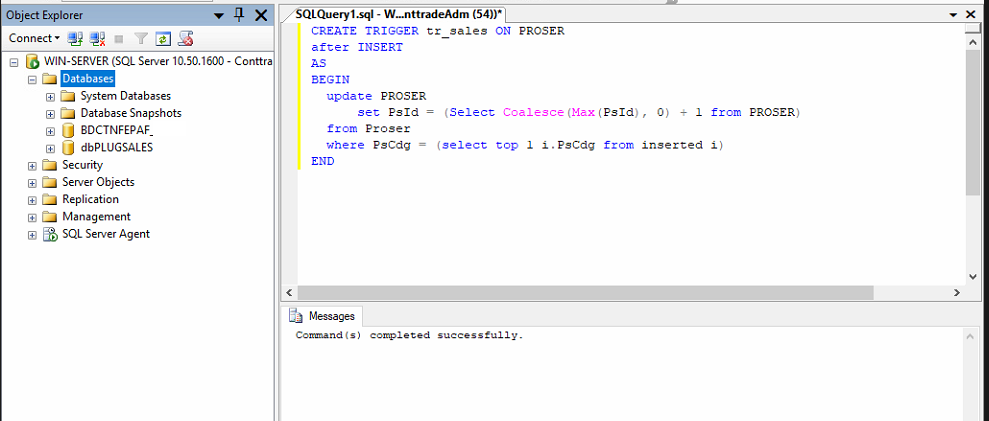
Criar a Trigger no SQL para Numerar o PsId. \
Abrir o SQL, selecionar o banco do Cliente e New Query e rodar o UPDATE abaixo.

```
CREATE TRIGGER tr_sales ON PROSER
after INSERT
AS
BEGIN
  update PROSER
      set PsId = (Select Coalesce(Max(PsId), 0) + 1 from PROSER)
  from Proser
  where PsCdg = (select top 1 i.PsCdg from inserted i) 
END
```

<figure><img src="https://1872949069-files.gitbook.io/~/files/v0/b/gitbook-x-prod.appspot.com/o/spaces%2FhBQVBIBQxcQsCXe7jUWv%2Fuploads%2FBgyK39KNaWEmdpxrBChN%2Fimage.png?alt=media&#x26;token=a26a2152-d4d3-41b7-b36b-44d472de9414" alt=""><figcaption></figcaption></figure>

## &#x20;Numerar os Produtos existentes

```
UPDATE PROSER
   SET PROSER.PsID = x.NewPsId
  FROM (
    SELECT ROW_NUMBER() OVER (ORDER BY PSCDG) AS NewPsId, PsCdg
      FROM PROSER V
  ) x
 WHERE PROSER.PsCdg = x.PsCdg
```

&#x20;

<figure><img src="https://1872949069-files.gitbook.io/~/files/v0/b/gitbook-x-prod.appspot.com/o/spaces%2FhBQVBIBQxcQsCXe7jUWv%2Fuploads%2FjEeE1DhoVZ8YkUOkDcnE%2Fimage.png?alt=media&#x26;token=68e22c8f-fedf-458b-909f-5ff6fadc43f5" alt=""><figcaption></figcaption></figure>


---

# Agent Instructions: Querying This Documentation

If you need additional information that is not directly available in this page, you can query the documentation dynamically by asking a question.

Perform an HTTP GET request on the current page URL with the `ask` query parameter:

```
GET https://suporte-conttrade.gitbook.io/instalacoes-reinstalacoes/instalacao-plug-sales/criando-o-numerador-do-psid-no-conttrade-erp.md?ask=<question>
```

The question should be specific, self-contained, and written in natural language.
The response will contain a direct answer to the question and relevant excerpts and sources from the documentation.

Use this mechanism when the answer is not explicitly present in the current page, you need clarification or additional context, or you want to retrieve related documentation sections.